OpenHRApp Reports and Analytics: Making Data-Driven HR Decisions
Data is one of the most underutilized assets in HR. Every attendance punch, leave request, and performance review generates data that can reveal patterns, predict trends, and inform better decisions — if you have the right tools to analyze it. OpenHR's reporting module transforms raw HR data into clear, actionable insights.
The Report Types Available
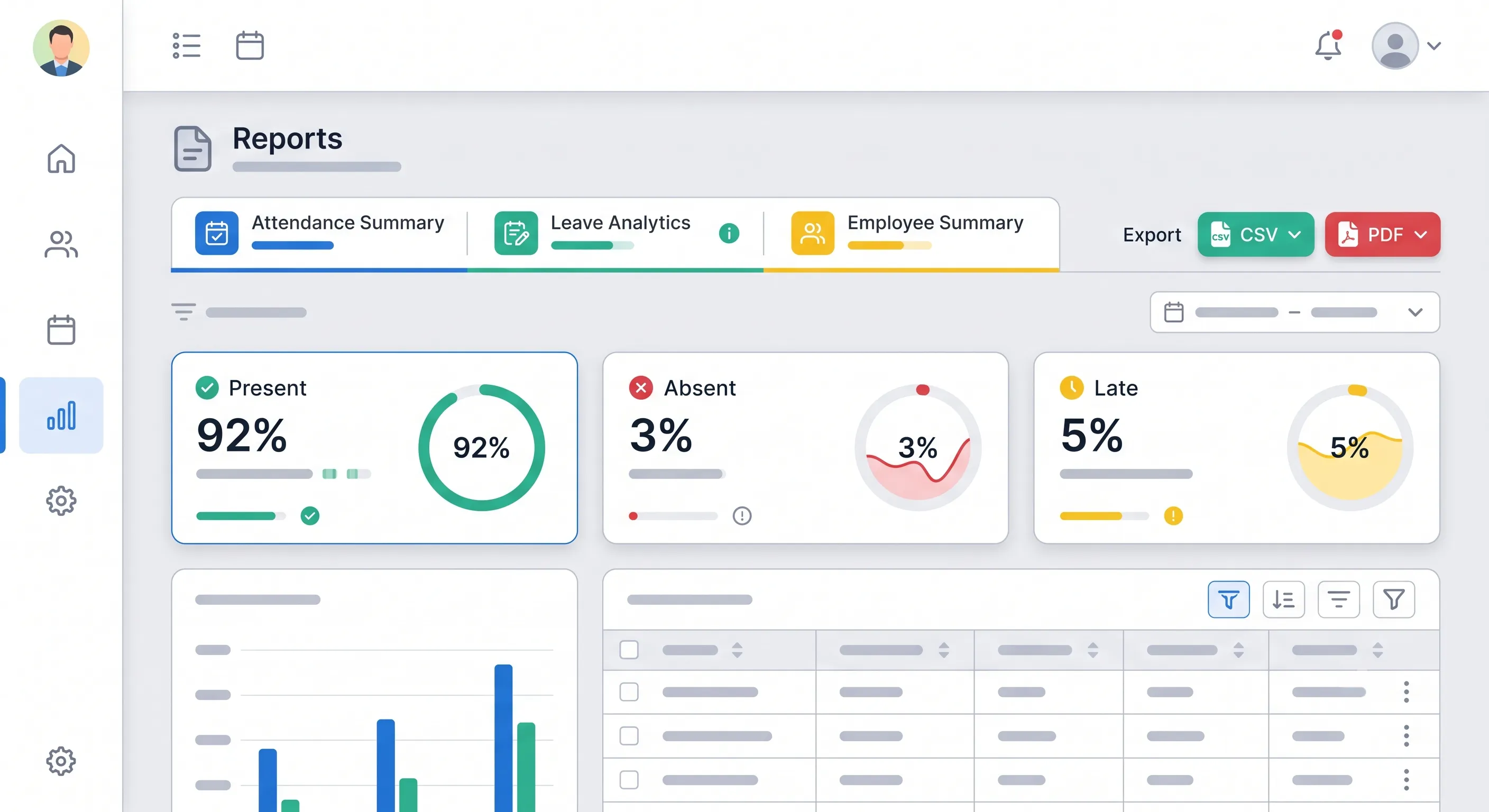
OpenHR provides several categories of reports, accessible from the Reports page by HR and Admin users.
Attendance Summary Reports
Attendance reports give you a complete picture of who is showing up, who is late, and who is absent. Available views include:
- Daily Summary — Who was present, absent, or late on a specific day. Useful for daily stand-ups or shift handovers.
- Weekly/Monthly Summary — Aggregated attendance data over a week or month. Ideal for identifying patterns — is one employee consistently late on Mondays? Is absenteeism spiking in a particular department?
- By Employee — Individual attendance history over a date range. Shows every check-in and check-out, lateness markings, and absence days.
- By Department — Compare attendance patterns across departments. Are some departments showing significantly higher absenteeism? This can be an early indicator of management or morale issues.
Each report includes metrics like:
- Total working days in the period
- Days present, absent, and late
- Attendance percentage
- Average check-in time
- Overtime hours (if applicable)
Leave Analytics Reports
Leave reports help you understand how leave is being utilized across your organization:
- Leave Utilization by Employee — How many days each employee has taken, organized by leave type (Annual, Sick, Casual, etc.). See at a glance who is using their leave and who is accumulating it.
- Leave Utilization by Department — Compare leave usage across departments. High leave usage might indicate burnout or disengagement; low leave usage might indicate employees are not taking time off when they should.
- Leave Balance Summary — Remaining balances for all employees. Useful for year-end planning — identify employees who need to use their remaining leave before it expires.
- Approval Analytics — Average approval turnaround time, rejection rates, and leave request volume by month. Helps managers and HR identify bottlenecks in the approval process.
Interactive Charts and Visualizations
Reports are not just tables of numbers. OpenHR includes interactive charts that make trends immediately visible:
- Attendance trend lines — See how attendance rates change week over week or month over month.
- Department comparison bar charts — Visually compare metrics across departments.
- Leave type distribution pie charts — See what proportion of leave is Annual vs. Sick vs. Casual.
- Drill-down capability — Click on a department in a chart to see individual employee data within that department.
Custom Date Range Filtering
Every report supports custom date ranges. You are not locked into predefined periods. Need to analyze attendance during a specific project phase? Export leave data for a compliance audit covering a specific quarter? Set any start and end date.
CSV Export
Every report can be exported to CSV with one click. The export includes all columns visible in the report, formatted for easy import into:
- Payroll software — Attendance data formatted for common payroll system import templates.
- Spreadsheets — Open in Excel or Google Sheets for additional analysis or charting.
- Compliance filings — Attendance and leave records formatted for labor law compliance reporting.

How to Use Reports Effectively
For Daily Operations
Start each day with a quick glance at the Daily Attendance Summary. See who is absent or late before the workday begins, so you can reassign tasks or arrange coverage proactively.
For Weekly Management Reviews
Run the Weekly Attendance Summary and scan for:
- Employees with attendance below 90% — check in with them to understand if there is an issue.
- Departments with unusual patterns — a spike in sick leave might indicate a health issue spreading through a team.
- Late arrival trends — is a particular shift consistently late? The shift timing may need adjustment.
For Monthly Payroll Processing
Export the monthly attendance summary and use it as the input for payroll calculations:
- Total days worked per employee.
- Overtime hours.
- Unpaid leave days (deduct from salary).
- Late arrivals (if your policy includes salary deductions for lateness).
Having a single, trusted data source for payroll eliminates the most common source of payroll errors: mismatched data between attendance and payroll systems.
For Strategic Planning
Quarterly or annually, use aggregate reports to inform strategic decisions:
- Headcount planning — Attendance and leave patterns help predict workforce availability.
- Policy adjustments — If leave utilization is consistently low, employees may not feel comfortable taking time off. If it is extremely high, your allowances may be too generous.
- Performance correlation — Do departments with higher absenteeism also have lower performance review scores? The correlation can reveal systemic issues.
- Budgeting — Overtime reports help forecast labor costs. Leave balance reports help forecast leave encashment liabilities.
Dashboard Widgets for At-a-Glance Insights
Beyond the dedicated Reports page, key metrics are embedded directly into the dashboard for quick access:
- Admin Dashboard — Summary cards for attendance rates, pending leave requests, and employee count.
- Manager Dashboard — Team-specific metrics: who is present, who is on leave today, team attendance rate.
- Employee Dashboard — Personal metrics: my attendance rate, my leave balance, upcoming holidays.
These widgets update in real time and provide the most frequently needed information without requiring a full report.
Data Accuracy and Integrity
Reports are only as good as the data they are built on. OpenHR ensures data accuracy through:
- Server-verified timestamps — Attendance times are recorded server-side, preventing manipulation.
- Automated calculations — Leave balances are calculated based on configured policies, not manual entries.
- Immutable records — Closed attendance sessions cannot be silently edited. All adjustments are logged with the admin's identity and timestamp.
- Consistent naming — Employee names, department names, and leave type names are standardized across all reports through the centralized configuration.
Conclusion
HR data contains valuable insights about your workforce — if you can access and understand it. OpenHR's reporting module transforms attendance and leave data into clear, actionable reports with one-click CSV export. Whether you need a daily attendance check, monthly payroll input, or quarterly strategic analysis, the data is ready when you are.
Further Reading
- Managing Employee Leave with OpenHRApp — See how leave data flows from employee applications into the reports and analytics covered here.
- How Selfie-Based Attendance Works in OpenHRApp — Understand the attendance data pipeline — from check-in to the summary reports that feed payroll.
Explore OpenHR's reporting and analytics — completely free. Get started.