Employee Privacy in the Age of Workplace Surveillance
Workplace monitoring technology has exploded. From keystroke loggers and screen recorders to GPS tracking and webcam monitoring, employers now have more tools than ever to watch what their employees are doing. But capability does not equal wisdom — and many organizations are discovering that heavy surveillance damages trust, morale, and ultimately, productivity.
This article explores how to adopt HR technology responsibly — getting the verification and accountability you need without crossing into invasive surveillance.
The Surveillance Arms Race
The COVID-19 pandemic accelerated a trend that was already underway: as employees moved out of physical offices, some employers responded by deploying digital surveillance tools to replicate the visibility they had lost. According to industry surveys:
- Over 60% of companies with remote workers use some form of monitoring software.
- 1 in 3 companies that adopted monitoring during the pandemic have kept it in place even after returning to hybrid work.
- Employee pushback against invasive monitoring has become a significant factor in turnover, particularly among knowledge workers who have other options.
The irony is that heavy surveillance often produces the opposite of its intended effect: employees who feel watched perform worse, not better. Studies consistently show that perceived autonomy and trust are far stronger drivers of productivity than monitoring.
Where Is the Line?
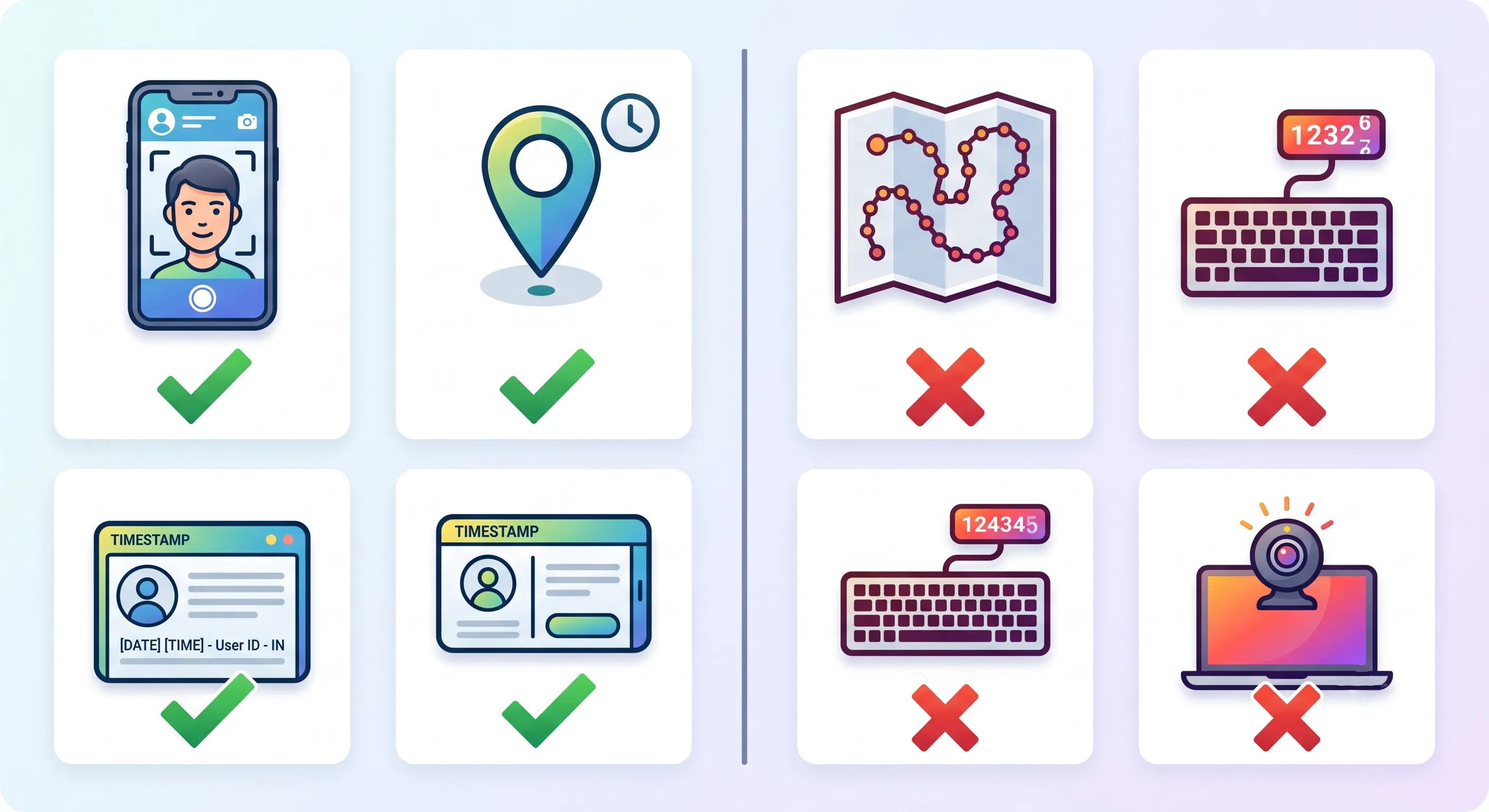
Not all monitoring is invasive. The key distinction is between verification and surveillance:
Verification (Reasonable)
- Capturing a selfie at the moment of attendance check-in to confirm identity.
- Recording GPS coordinates at check-in to confirm the employee is at their work location.
- Logging access to sensitive systems for security auditing.
- Tracking time spent on specific projects for client billing purposes.
Surveillance (Problematic)
- Continuous location tracking throughout the workday.
- Keystroke logging to measure "activity levels."
- Random webcam captures to verify presence at the desk.
- Screen recording without specific, disclosed reasons.
- Monitoring personal devices or personal accounts.
The difference comes down to three factors: purpose, proportionality, and transparency.
- Purpose: Is the data being collected for a specific, legitimate business need (payroll accuracy, security, client billing)? Or is it being collected "just in case" it might be useful?
- Proportionality: Is the minimum amount of data being collected to achieve the purpose? GPS at check-in verifies work location. Continuous GPS tracking goes far beyond what is needed.
- Transparency: Do employees know exactly what is being tracked, when, and why? Have they consented?
Designing Privacy-Respecting Attendance Tracking
Attendance tracking illustrates the difference between verification and surveillance:
Bad approach: Require employees to install an app that tracks their location continuously from 9 AM to 6 PM, flagging any time they leave a designated geofenced area. This treats adults like parolees and generates constant anxiety.
Good approach (OpenHR's approach): Employees take a selfie and the app captures GPS coordinates at the moment of check-in. That is it. No continuous tracking. The data shows: "Employee X checked in at 8:58 AM from location Y." It does not show where the employee went for lunch.
This approach achieves the legitimate business goal — verifying attendance and work location — without unnecessary intrusion.
Data Privacy Best Practices for HR Systems
Collect Only What You Need
Before adding any new data field to your HR system, ask: "What decision does this data enable? Would we make a different decision without it?" If you cannot articulate a specific, legitimate use, do not collect it.
Limit Access Rigorously
Use role-based access controls (RBAC) to ensure:
- Employees can only see their own data.
- Managers can only see their direct reports' data.
- HR can see organization-wide data but only for legitimate HR functions.
- No single person has unrestricted access to all employee data without oversight.
OpenHR implements these controls by default — every query is scoped to the user's role and organization.
Have a Retention Policy
Do not keep data forever. Define how long different types of data are retained:
- Attendance logs: typically 3–7 years (for labor law compliance).
- Performance reviews: typically 3–5 years after employment ends.
- Selfie photos: delete after a reasonable verification period (e.g., 30 days) unless needed for an active investigation.
Automated data cleanup prevents the accumulation of sensitive data that could be exposed in a breach.
Secure the Data
- Encrypt data at rest and in transit (HTTPS, database encryption).
- Require strong authentication (strong passwords, and ideally multi-factor authentication).
- Regularly audit access logs — look for unusual patterns (HR staff accessing their own records, access outside of business hours, bulk data exports).
- Have an incident response plan for data breaches that includes notifying affected employees promptly.
The Legal Landscape
Employee privacy laws vary significantly by jurisdiction, but several principles are nearly universal:
- GDPR (Europe): Requires a lawful basis for processing employee data, data minimization, purpose limitation, and transparency. Employees have the right to access their data and request deletion.
- CCPA/CPRA (California): Gives employees rights to know what data is collected, to opt out of certain uses, and to request deletion.
- Common law privacy torts: In many jurisdictions, employees can sue for "intrusion upon seclusion" if monitoring goes beyond what a reasonable person would find acceptable.
The legal trend is consistently toward stronger employee privacy protections. Organizations that implement privacy-respecting practices now will be ahead of the regulatory curve — and will avoid the compliance scramble when new laws take effect.
Building Trust Through Transparency
The single most effective privacy practice is also the simplest: tell employees what you are doing and why.
Before rolling out any new HR technology (attendance tracking, performance monitoring, etc.):
- Explain what data will be collected. Be specific — not "we may collect location data," but "the app will record your GPS coordinates at the moment you check in."
- Explain why it is collected. "This confirms you are at your work location when you start your shift."
- Explain who can see it. "Your manager and HR can see your check-in location. Other employees cannot."
- Explain how long it is kept. "Attendance records are retained for 3 years for labor law compliance. Location data older than 30 days is automatically purged."
- Give employees a way to ask questions. A brief Q&A session or a written FAQ can address concerns before they become resentment.
When employees understand what is being tracked and why — and when they see that the tracking is limited, purposeful, and transparent — most are comfortable with reasonable verification measures. Resistance arises when tracking feels secretive, excessive, or disrespectful.
The Business Case for Privacy
Privacy-respecting HR practices are not just ethically right — they are good for business:
- Higher trust and morale — Employees who feel respected perform better and stay longer.
- Lower turnover — Invasive monitoring is a top reason knowledge workers cite for leaving jobs.
- Reduced legal risk — Privacy-respecting practices reduce the likelihood of lawsuits and regulatory fines.
- Better recruiting — In a competitive talent market, "we do not spy on our employees" is a compelling pitch.
- Data minimization reduces breach impact — The less data you collect, the less there is to be exposed in a breach.
Conclusion
The goal of HR technology should be to support and empower employees, not to surveil them. Attendance verification, identity confirmation, and location tracking all serve legitimate business needs — when implemented with purpose, proportionality, and transparency. The best HR platforms make verification painless and privacy-respecting, not intrusive and anxiety-inducing. As you evaluate HR tools, make privacy practices a primary selection criterion — not an afterthought.
Further Reading
- How Selfie-Based Attendance Works in OpenHRApp — See how OpenHR balances identity verification with privacy (GPS at check-in only, no continuous tracking).
- Remote Work and HR: Adapting Your Policies for a Distributed Workforce — Privacy considerations for distributed teams, including data security for remote workers.
OpenHRApp is designed with employee privacy in mind: selfie verification at check-in only, GPS captured only at the moment of check-in, no continuous tracking, and role-based access controls. Learn more.